Estimates your customers sign on their phone.
Type the job the way you would text it. Out comes a clean estimate with your name on it. Your customer signs it and pays the deposit. No app for them.
30 days free, then $29 a month. No card to start.
Write it, send it, get it signed.
Describe the job
Type rough notes or talk into your phone. The spelling gets fixed and the job gets laid out under your company name.
Send it your way
Email it, text it from your own number, or show a QR code on the spot. No app or account for the customer.
They sign and pay
They type their name, sign with a finger, and pay the deposit. You get an alert and a signed PDF.
Watch it: one job, typed to signed, in under a minute Open on YouTube
Type a job. See the page your customer signs on.
Rough notes are fine. The estimate opens the way your customer gets it. Then sign it yourself and see what they see. No account.
 On a computer? Scan to see it the way your customer would, on a phone.
You know when they read it, and the deposit is paid when they sign.
Then packages to pick from and photos of the job, when the job calls for it.
You know the minute they open it.
An alert when they read it, another when they sign. If they go quiet, a follow-up goes out from you on day 3 and day 7.
- Edit and resend; the old link points to the new one
- Customers decline or request changes in one tap
- Monday email: what's open, what's owed, what got signed
Deposit at signing. Balance with one tap.
The deposit is paid the moment they accept. When the job is done, one tap requests the balance. Take checks and Venmo instead? Mark it paid.
- Processed by Stripe and paid out to your own bank
- Cards only, which covers Apple Pay and Google Pay
- Reminders on day 3 and 7 if a balance sits
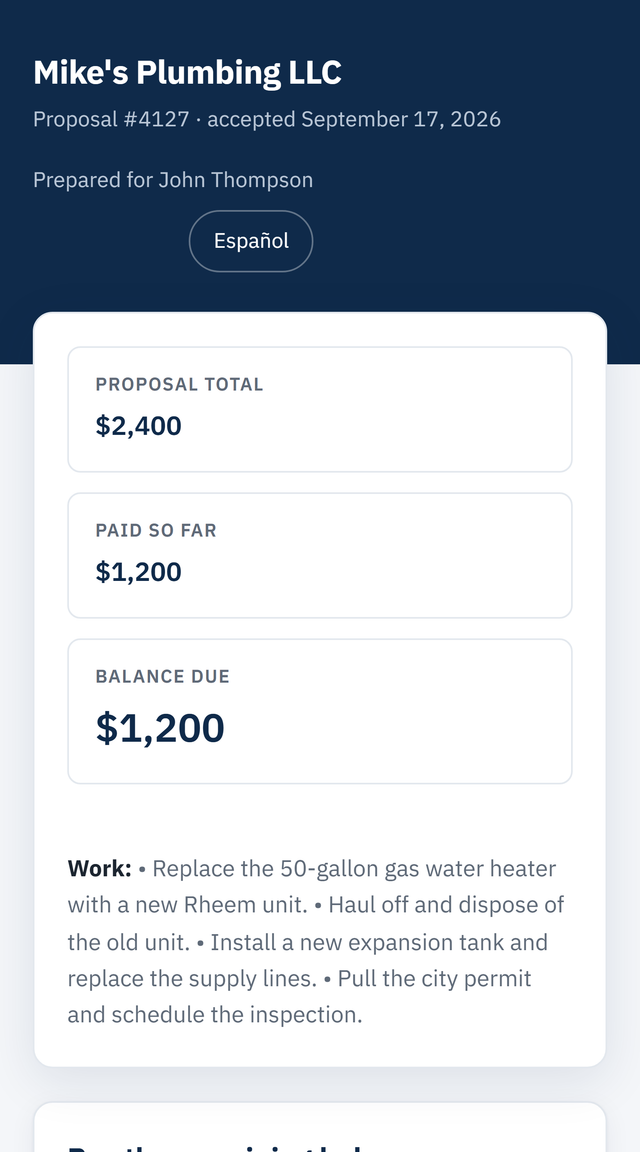
Give them two prices and let them pick.
Standard and Premium. Repair and Replace. Extras they can tick. The total updates as they tap, and the deposit follows.
- Name the packages whatever you want
- Deposit and balance follow the pick automatically
- Skip it and the bid is one price, same as always
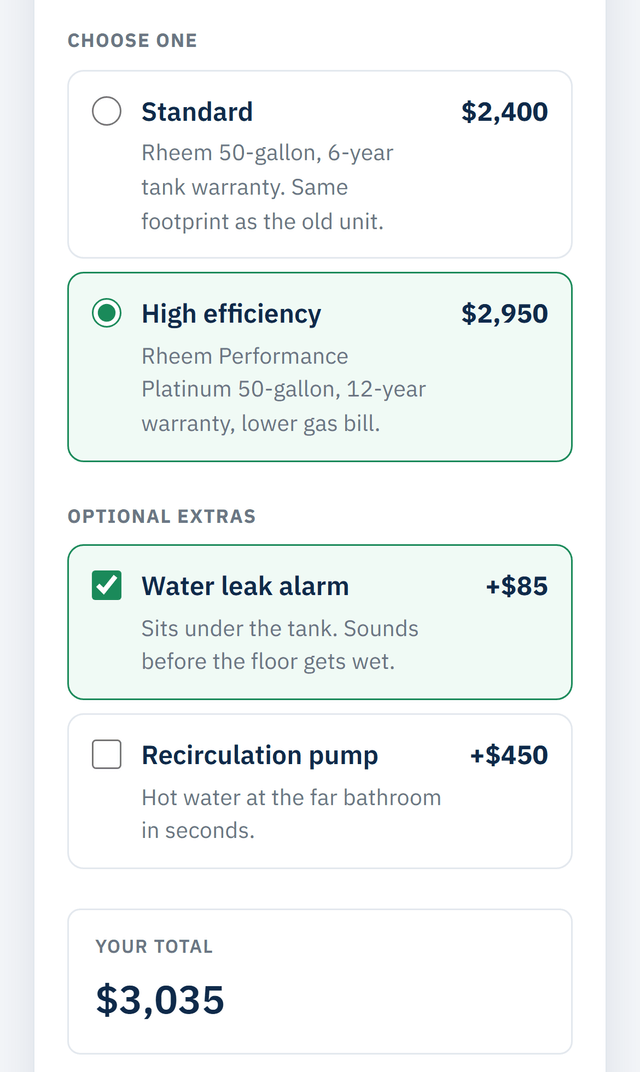
Show them what the price fixes.
Pictures from the walkthrough go on the estimate under the scope. The spouse who was not there sees them too.
- From your camera roll, resized for you
- On the web page and the PDF
- "Our work" photos set once, shown on every proposal








Every bid, and where it stands.
One list. Who opened it, who signed, who still owes you. The next thing to do is always one tap.
Works from your phone. Add it to your home screen and it opens like an app.
Built for small contractors.
A text has no signature, no deposit, and no way to know if they read it. The big platforms are built for crews and priced like it.
| Feature | BidWriter Pro | A text or a Word doc | Big field-service platform |
|---|---|---|---|
| Price | $29 a month, flat | Free | $49 to $199 and up for one person, more with a crew, plus add-ons |
| Time to send a bid | About two minutes, from your phone | Tonight, at the computer | Fast, after hours of setup |
| Signing | They tap the link and type their name. Legally binding. | "Sounds good" by text, or print, sign, scan | Often behind a client portal login |
| Deposit | Paid by card as they sign, or recorded by hand | You wait on a check | Card payments, sometimes an add-on |
| Did they read it? | You get an alert when they open it | No way to know | Usually yes |
| Follow-up | Goes out on day 3 and day 7 without you | Only if you remember | Often a higher tier |
| Packages and extras | Included | Two separate quotes | Often a higher tier |
If you dispatch crews and run payroll, use one of the big platforms. This is for contractors who write their own bids.
Side by side: vs Jobber · vs Housecall Pro · vs Joist
One plan. Everything included.
No add-ons. No per-bid fees. No seats.
No asterisks. The price you see is the amount on your card. No add-ons, no seats, no setup fee, no contract.
Questions contractors ask first.
Is the signature legally binding?
Yes. Your customer types their full name, can sign with a finger, and clicks Accept. We record the name, date, time, and the exact proposal they agreed to, including which package and extras they picked. That is a valid electronic signature under the federal E-SIGN Act and state law.
Does my customer need an app or an account?
No. They tap the link in your text or email, the proposal opens in their phone's browser, they read it, pick, and sign. Nothing to download, nothing to set up.
What happens if they don't sign?
You see whether they opened it, and the app follows up for you on day 3 and day 7, and once more before the proposal expires, unless you turn that off. Customers can also ask for changes or decline right from the proposal, so you hear something either way.
How do I get paid?
Your call. Turn on card payments and the deposit is paid when they sign, with the balance requested by one tap later. Or collect cash, check, Venmo, or Zelle yourself and record it with Mark paid. Either way there is an invoice PDF.
Does it change what I wrote?
It fixes spelling and lays your notes out cleanly. It does not add scope, exclusions, or promises you didn't make. The price, terms, timeline, warranty, packages, and extras are exactly what you entered.
Can I use it on my phone?
Yes. Everything works from a phone browser, from writing the bid to sending it by text to marking it paid. Add it to your home screen and it opens like an app.
What if my customer is not good with phones?
They tap a link and type their name. There is nothing to install and no account to make. If they would rather sign in person, show them the QR code on your phone, or print the PDF and have them sign on paper.
Who holds the money?
Not us. Card payments are processed by Stripe and paid out to your own bank account. Card numbers never touch our servers. Your first payout takes longer while Stripe verifies your account; after that it is usually about two business days.
What happens to my bids if I cancel?
They stay. Every proposal link, signed PDF, and customer record keeps working, and you can export everything as a spreadsheet. Cancelling only stops you from writing new bids.
What happens when the 30 days are up?
Nothing is charged, because we never had your card. You pick monthly or annual to keep writing new bids. If you do nothing, the bids you already sent, their links, and the signed PDFs keep working.
What do card payments cost?
Only something if you turn them on. Card processing is 2.9% plus 30 cents, and we add 1%. On a $1,000 deposit that is about $39. Take cash, check, Venmo, or Zelle and there is no fee at all.
How do the follow-ups go out?
By email, under your company name, on day 3, day 7, and once before the proposal expires. They go to bids you emailed. If you sent it by text, the bid shows a Text a nudge button once the customer has opened it, and that text comes from your own phone. You can turn follow-ups off on any bid.
Does it work with QuickBooks?
There is no direct connection. Every bid and payment exports to a spreadsheet your bookkeeper can bring in, and invoices and signed proposals download as PDFs.
How long does setup take?
Enter your company name and trade once, then write a bid. Phone, license number, and terms are optional. Card payments are optional too and take about five minutes with Stripe.
What does it cost?
$29 a month, flat. Unlimited proposals, no per-bid fees, no add-ons, no seats. Your first 30 days are free with no card required, and you can cancel anytime.
Short guides, useful whatever you use: what to include in an estimate · how to follow up · why customers go quiet · what Jobber costs · all guides
Send your next estimate with it.
Free for 30 days. No card. If it does not help, you have paid nothing.
Start freeFree for 30 days · No credit card · Cancel anytime